
Nginx sub-domain
更新日期:
In order to make the search web and admin search share the same root url (https://localhost) and distinguish each by sub domain(/admin and /search respectively), we need to modify most URL in our project since currently we use absolute path to visit resource.
When we configure nginx to support it, we need to change the way of how we request resource.
For example, currently we access an image with the url of “https://localhost:3000/assets/image01.jpg”. But after we turn on nginx’s sub domain functionality, we need to change the way to “https://localhost/admin/assets/image01.jpg”
Actually, we need to change all the url on our web pages.
Here is the resource category:
- Assets
1-a. Style sheets
1-b. Javascript files
1-c. Image on the html
1-d. Image in css
1-e. Image inserted into html by js
- Request url
2-a. url on html (hyper link & form)
2-b. url in js (such as ajax url)
With some investigation, we found we can take advantage of Rails tag to solve the problem.
When we set config.relative_url_root = “/admin” in application.rb, then Rails will prepend “/admin” when generating links. So we need to use rails tag in our project as more as possible.
As to 1-a (style sheets) and 1-b (javascript files)
I use rails tag ‘javascript_include_tag’ and ‘stylesheet_link_tag’ to request css & js resource.
Before:
After:
Now 1-a (style sheets) and 1-b (javascript files) can be requested in sub-domain mode.
As to 1-c (Image on the html) and 2-a (url on html)
There are two ways to introduce them into html.
One way is creating them with rails tag, such as image_path. Since the url is created by rails tag, then it should work well in sub-domain mode. Just leave it alone.
The other way is the url is specified by developer. The url can be relative-path and it also can be absolute-path.
- If it is relative-path, then it would work well in sub-domain mode.
- If it is absolute-path, then we need to prepend the sub-domain for the url. Fortunately, we can get the sub-domian from config.relative_url_root and what we need to do is only adding the relative_url_root before the url.
I store relative_url_root into the variable @root_url.
So if you request an image in html with the following way:
Now you need to change it to:
As to 1-d (Image in css)
We can use relative-path to access image
Before: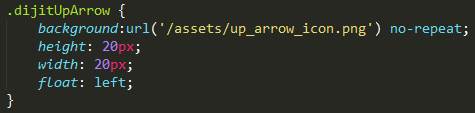
After: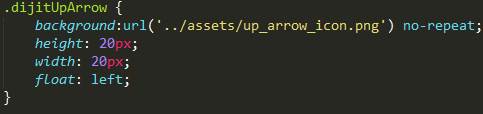
As to 1-e(Image inserted into html by js) and 2-b (url in js)
The url must be specified by developer. So,
- If it is relative-path, then it would work well in sub-domain mode.
- If it is absolute-path, then we need to prepend the sub-domain for the url.
There is a global js variable global_root_url which represent the relative_url_root
So if you specify url in js with the following way: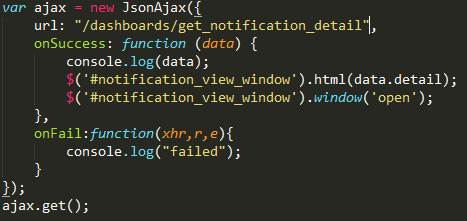
Then you need to change it to: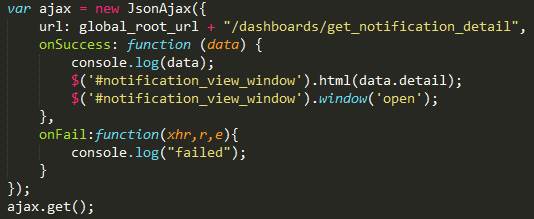
Besides, when we use redirect_to to redirect user to some page, then we also need to specify the sub domain for url.
Before:
After:
Actually, if we don’t set config.relative_url_root, then both @root_url and global_root_url are empty string.
I have tested it in my environment and it works well both in development and production mode.
